mirror of
https://github.com/BeamMW/Beam-Mirror-Wallet.git
synced 2026-10-03 23:02:06 +00:00
Beam Mirror Wallet
- JavaScript 100%
| Filename | Latest commit message | Latest commit date |
|---|---|---|
| bridge.cfg | ||
| bridge.js | ||
| client-sample.js | ||
| mirror.cfg | ||
| mirror.js | ||
| README.md | ||
| test.crt | ||
| test.key | ||

Beam Mirror Wallet
You can use Mirror Wallet to isolate your wallet from changes from the outside. It consists of two parts, a bridge, and a mirror. Bridge runs on the private host near the Wallet API and pushes wallet data to the Mirror host.
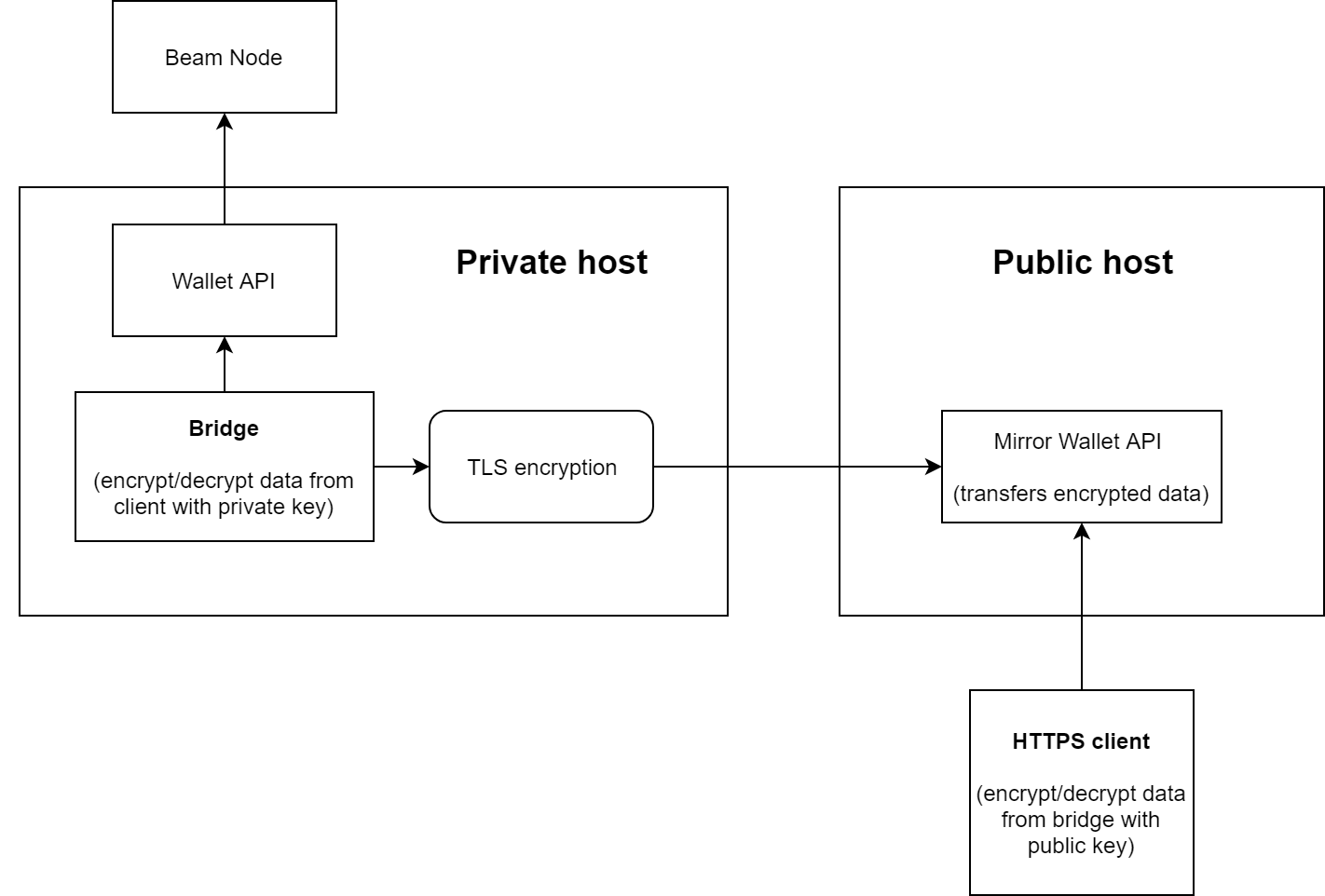
Steps to initialize Mirror Wallet
- Install latest Nodejs to private and public hosts (
sudo apt-get install nodejsor download from https://nodejs.org) - Run Beam Wallet API with enabled ACL on a private host (example:
wallet-api-masternet --node_addr eu-node01.masternet.beam.mw:8100 --use_acl 1, read more here https://github.com/BeamMW/beam/wiki/Beam-wallet-protocol-API#user-authorization) - Clone this repo to a private host,
configurebridge.cfg
run{ "push_period": 1000, // data pushing period "mirror_addr": "127.0.0.1", // public host address "mirror_port": 8080 // public host port "wallet_api_addr": "127.0.0.1", // Wallet API address "wallet_api_port": 10000, // Wallet API port "wallet_api_use_http": true, // use HTTP connection with Wallet API "use_tls" : false, // use TLS protocol to connect to the Mirror "private_key" : "beam-private.pem" // private key to sign all the messages with the Mirror }node ./bridge.js --generate-key-pairto generate private and public keys,
copy generatedbeam-public.pemto the HTTP Client host,
runbridge.jsscript by callingnode bridge.js. - Clone this repo to a public host,
configuremirror.cfg,
run{ "http_api_port": 80, // port for incomming http(s) requests "mirror_port": 8080, // server port for bridge connection "use_tls" : false, // use TLS protocol to talk with the Bridge and HTTP clients "tls_cert" : "test.crt", // path to TLS private key "tls_key" : "test.key", // path to TLS certificate "public_key" : "beam-public.pem" // public key, to make sure you have a conversation with your own Bridge }mirror.jsscript by callingnode mirror.js. - Look at the client-sample.js to understand how to encrypt/decrypt data from from bridge.